
Networking
Overview
Remote Access
$docker compose restart
Restarting minepanel-frontend ... done
Restarting minepanel-backend ... done
Minepanel is now available at your LAN IP
Update docker-compose.yml:
environment:
  - FRONTEND_URL=http://your-ip:3000
- NEXT_PUBLIC_BACKEND_URL=http://your-ip:8091docker compose restartNetwork Settings (UI)
Configure IPs in Settings → Network Settings:
| Setting | Use |
|---|---|
| Public IP / Domain | Discord notifications, external players |
| LAN IP | Local network players |
Find your LAN IP:
# Mac
ipconfig getifaddr en0

# Linux
hostname -I | awk '{print $1}'

# Windows
(Get-NetIPAddress -AddressFamily IPv4 -InterfaceAlias "Ethernet").IPAddressConnectivity Tab (per server)
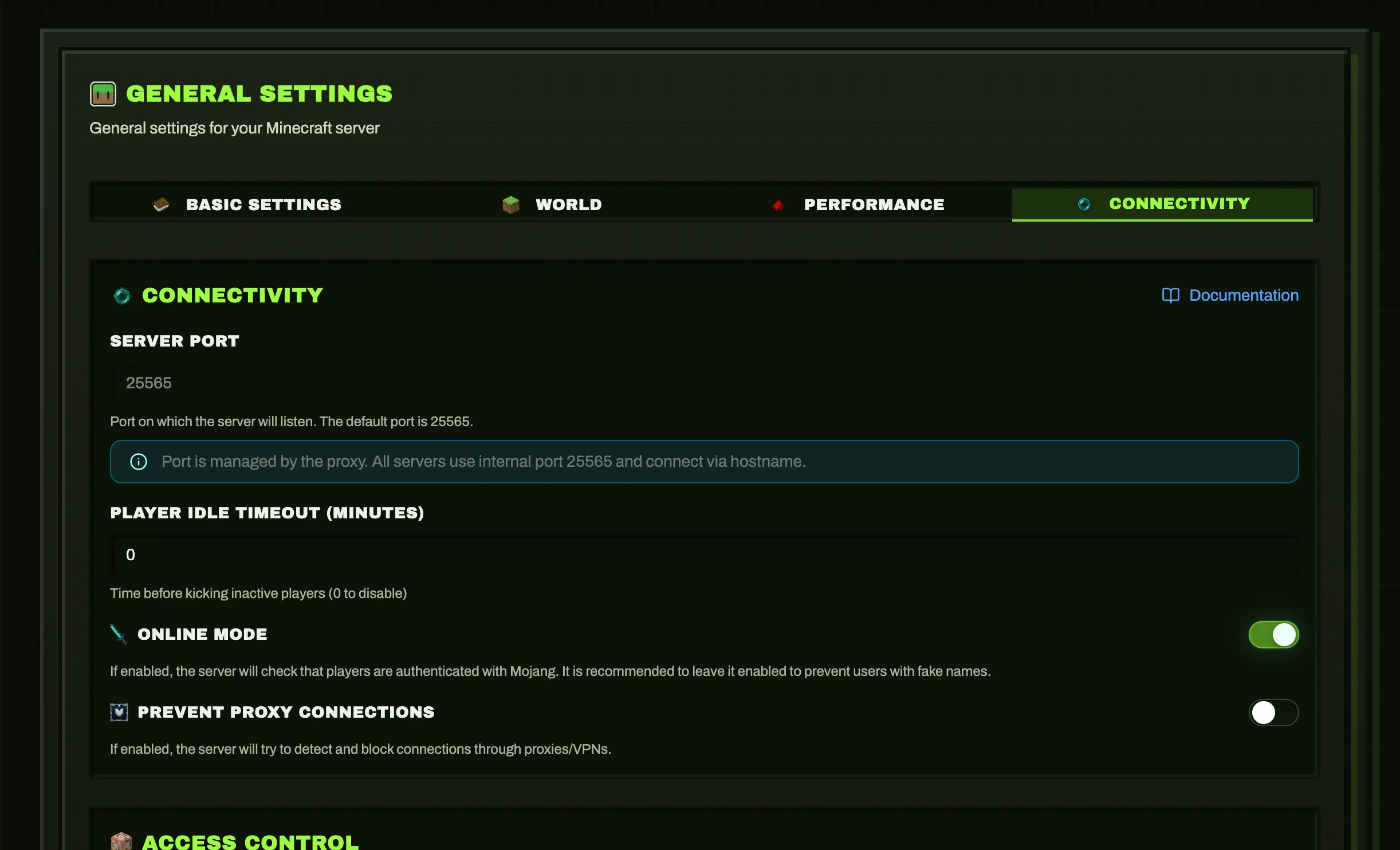
Minepanel server configuration includes General -> Connectivity.
Key fields:
| Field | What it affects |
|---|---|
serverPort | Published game port (25565 Java, 19132 Bedrock by default) |
onlineMode | Mojang auth verification for Java servers |
preventProxyConnections | Blocks bypass connections when using Java proxy routing |
ops | Operator usernames |
opPermissionLevel | Java op permission level (1-4) |
Notes:
- If Java proxy is enabled globally, port mapping may be controlled by proxy mode.
- Bedrock uses UDP and does not use Java proxy routing.
Ports
| Service | Default | Protocol | Description |
|---|---|---|---|
| Frontend | 3000 | TCP | Web UI |
| Backend | 8091 | TCP | API |
| Java Servers | 25565+ | TCP | Java Edition games |
| Bedrock Servers | 19132+ | UDP | Bedrock Edition games |
Bedrock UDP
Bedrock uses UDP, not TCP. Make sure your firewall rules specify the correct protocol.
Open firewall:
# Minepanel
sudo ufw allow 3000/tcp
sudo ufw allow 8091/tcp

# Java servers
sudo ufw allow 25565/tcp

# Bedrock servers
sudo ufw allow 19132/udpSSL/HTTPS
Nginx + Let's Encrypt
# /etc/nginx/sites-available/minepanel
server {
    listen 80;
    server_name minepanel.yourdomain.com;

    location / {
        proxy_pass http://localhost:3000;
        proxy_http_version 1.1;
        proxy_set_header Upgrade $http_upgrade;
        proxy_set_header Connection 'upgrade';
        proxy_set_header Host $host;
    }
}sudo certbot --nginx -d minepanel.yourdomain.comUpdate environment:
- FRONTEND_URL=https://minepanel.yourdomain.com
- NEXT_PUBLIC_BACKEND_URL=https://api.yourdomain.comCaddy (Auto SSL)
minepanel.yourdomain.com {
    reverse_proxy localhost:3000
}

api.yourdomain.com {
    reverse_proxy localhost:8091
}MC Proxy Router (Java Only)
Single port (25565) for all Java servers via hostname routing.
Java Edition Only
mc-router only works with Java Edition (TCP protocol). Bedrock servers use UDP and cannot be proxied this way. Each Bedrock server needs its own port.
Setup
DNS: Create wildcard record
*.mc.example.com → your-ipSettings: Configure base domain in Settings → Proxy Settings
Start mc-router:
docker compose --profile proxy up -dJava servers auto-get hostnames: {server-id}.mc.example.com
Bedrock Connection
Bedrock servers connect directly via IP and port:
Server Address: your-ip
Port: 19132 (or assigned port)Troubleshooting
| Issue | Fix |
|---|---|
| CORS errors | FRONTEND_URL must match browser URL exactly |
| Can't access remotely | Check firewall, update FRONTEND_URL |
| Connection refused | docker ps to check containers running |
→ More: Troubleshooting